A YouTube thumbnail has one job: to get the click. It doesn’t matter how good your video is if nobody clicks on it. Understanding how to make youtube thumbnails that perform well is one of the highest-leverage skills for any creator in 2026. These 12 thumbnail design tips are based on what consistently works across different niches and video types.
Key Takeaways
- High-CTR thumbnails have one clear focal point — face, object, or text
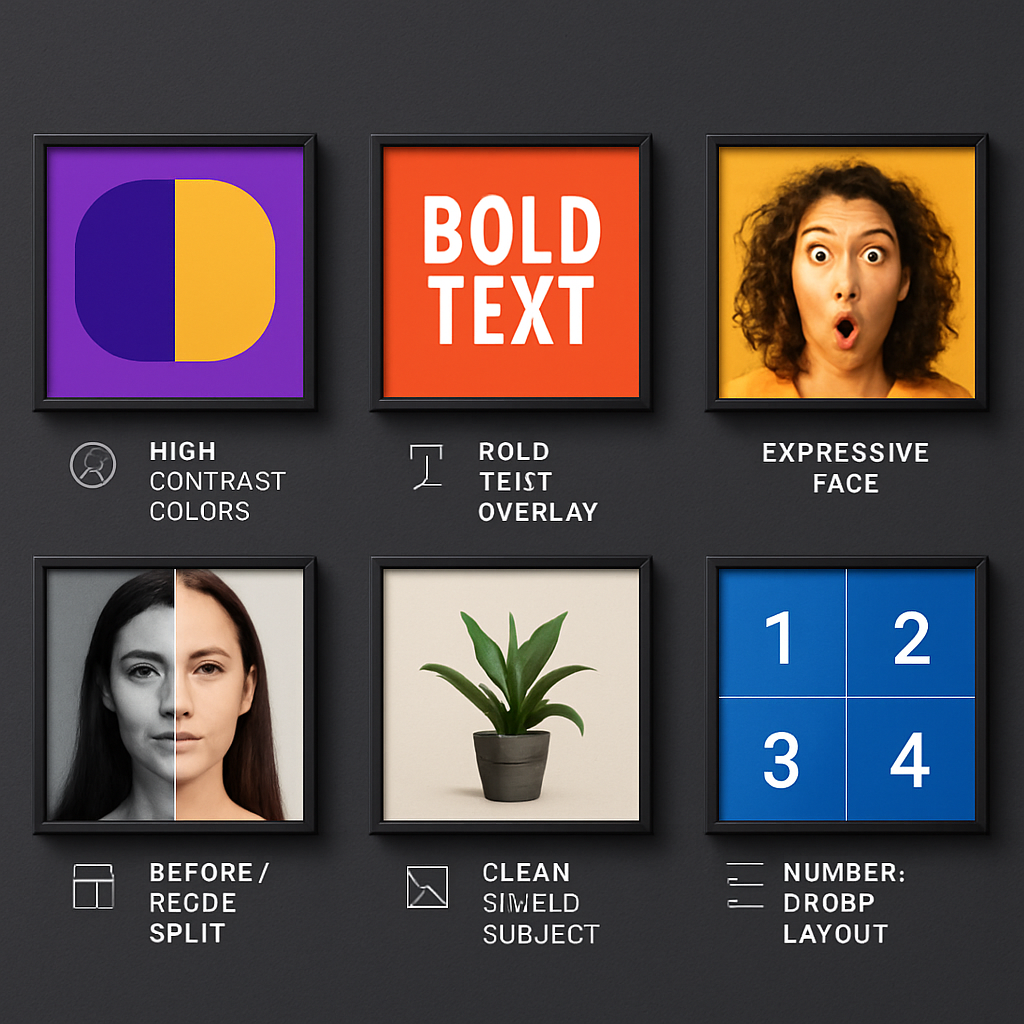
- Increase thumbnail ctr by using high contrast (bright colors against dark backgrounds or vice versa)
- Faces showing emotion outperform neutral or no-face thumbnails on most content types
- 3-5 words of text is optimal — more words hurt readability at small display sizes
- The thumbnail design tips that matter most: contrast, clarity, and a clear promise of what the video delivers
- Always research what top-performing thumbnails look like in your niche — use the thumbnail downloader to save examples
Why Thumbnails Matter More Than You Think
YouTube’s own thumbnail guidance emphasizes how dramatically thumbnails affect performance — changing a thumbnail can increase views on an existing video by 30-200%. Your thumbnail appears in search results, the home feed, recommendations, and suggested videos — it’s your single most powerful piece of visual marketing.
The average YouTube browse session involves a viewer making dozens of thumbnail-based decisions in seconds. A thumbnail that looks like everything else gets ignored.
Tip 1: Use One Clear Focal Point
Thumbnails that try to show too much show nothing effectively. Pick one thing the viewer should look at first:
- A person’s face and expression
- A key object or product
- One bold text statement
Everything else in the thumbnail should support that focal point, not compete with it.
Tip 2: Use High Contrast
High contrast thumbnails stand out in a feed of competing videos. This means:
- Bright subjects on dark backgrounds (or dark subjects on bright backgrounds)
- Bold, legible text in a contrasting color to the background
- Avoiding mid-tone compositions where everything blends together
Yellow, orange, and red on dark backgrounds are among the highest-CTR color combinations in 2026 data from creators who track their analytics.
Tip 3: Show Emotion on Faces
This is one of the most consistent findings in thumbnail testing: emotional faces outperform neutral faces. Surprise, excitement, concern, or exaggerated disbelief communicate a story instantly.
Studies from creators like MrBeast and analysis of high-CTR channels — including case studies on the official YouTube blog — confirm that exaggerated facial expressions (pointing, reacting, wide eyes) reliably outperform calm, neutral photos.
Tip 4: Use 3-5 Words Maximum
Text in thumbnails should:
- Be readable at 320×180 (thumbnail size in search results on desktop)
- Add context the image alone doesn’t convey
- Not summarize the title — hint, provoke curiosity, or add urgency
More than 5-7 words and the text becomes illegible at small sizes. Short phrases like “BIGGEST MISTAKE,” “I WAS WRONG,” or “FINALLY WORKS” are the template.
Tip 5: Create Curiosity or Imply a Transformation
Thumbnails that get the most clicks often hint at a transformation or resolution without revealing it:
- Before/after comparisons
- A surprising or unexpected outcome
- A reaction to something unseen in the thumbnail
The viewer clicks to find out what happened. This is why “reaction” style thumbnails and before/after formats work so well in 2026 — they create an open loop the viewer wants to close.
Tip 6: Use Bold, Readable Fonts
Thin fonts, script fonts, and decorative typefaces are hard to read at thumbnail display sizes. Use:
- Bold sans-serif fonts (Impact, Montserrat Bold, Bebas Neue, Anton)
- Minimum effective size: characters should be at least 80-100px tall on a 1280×720 canvas
- White text with a dark stroke or drop shadow for readability on any background — see MDN’s text-shadow reference if you’re rendering thumbnail text in HTML before exporting
Tip 7: Keep the Background Uncluttered
Busy backgrounds compete with your focal point for attention. Options:
- Blur the background (shallow depth of field or post-processing blur)
- Use a solid or gradient background
- Overlay a color tint on a photo background to reduce visual noise
The subject should pop off the background, not blend into it.
Tip 8: Match the Emotional Tone of the Video
If your video is funny, the thumbnail should signal humor. If it’s alarming, the thumbnail should signal urgency. Mismatch between thumbnail emotion and video content trains viewers to distrust your thumbnails — they’ll stop clicking even when your content is good.
Tip 9: Use Color Psychology Strategically
Different colors trigger different responses in viewers:
- Red/orange: Urgency, excitement, energy — works for news, controversial takes, game content
- Yellow: Happiness, attention — works for entertainment, how-to content
- Blue/teal: Trust, tech, calm — works for educational and business content
- Black/white high contrast: Sophistication, drama — works for cinematic content
Choosing colors intentionally rather than defaulting to whatever was in the scene is a hallmark of high-CTR thumbnail design.
Tip 10: Look at Your Competitors’ Top Videos
Before designing a thumbnail, search your target keyword on YouTube. Look at the thumbnails on the top 5-10 results. Notice:
- What colors dominate the first page?
- Do thumbnails have faces or not?
- What text patterns appear?
You want to fit the visual grammar of the category (so you look relevant) while standing out enough to get noticed. The YouTube Thumbnail Downloader lets you save those examples for direct comparison.
Tip 11: Test Multiple Versions
YouTube Studio’s A/B testing feature (Test & Compare, rolled out broadly in 2024-2025) lets you test two thumbnails against each other on your real audience. Use it whenever you’re unsure which approach will win. For a full guide, see YouTube Thumbnail A/B Testing.
Tip 12: Maintain Consistent Branding Across Your Channel
Viewers who’ve watched your videos before should be able to recognize your thumbnails in a feed. Consistent branding elements:
- Color scheme (2-3 primary colors used consistently)
- Font choice and placement
- Similar composition style
- Logo or watermark in a consistent position
Consistency builds channel identity. When viewers recognize your visual style, they’re more likely to click because they already trust your content.
The Fastest Way to Research Thumbnail Design
One of the most useful practices is downloading high-performing thumbnails from channels in your niche and analyzing what they share. The YouTube Thumbnail Downloader makes this easy — paste a video URL, grab the thumbnail in HD, and build a reference library.
Conclusion
Learning how to make youtube thumbnails that get clicks takes practice and testing, but the fundamentals are consistent: one focal point, high contrast, emotional faces, minimal text, and a design that fits your niche while standing out visually. Use the thumbnail downloader to research what’s working in your category, build your design skills, and test consistently.
For related thumbnail guidance, see the YouTube Thumbnail Size Guide to make sure your specs are correct before you start designing.